
İLK QWEN API ÇAĞRISI
Qwen Quest • Stage 03
Qwen Quest • Stage 03
Model Studio, modelleri OpenAI uyumlu API ve DashScope SDK üzerinden kullanmanızı sağlar. Bu bölümde Qwen modeline ilk API çağrınızı nasıl yapacağınızı öğreneceksiniz.
API çağrısı yapmadan önce Alibaba Cloud hesabınızın hazır olması gerekmektedir. ATP programına kaydolduysanız, e-posta adresinize gönderilen yönergeleri takip edin.
Hesabınız oluşturulduktan sonra Model Studio konsoluna giriş yaparak servisi aktif edin.
API çağrıları için gerekli olan API Key'inizi oluşturun. Bu anahtar, uygulamalarınızın Qwen modellerine erişmesini sağlar.
Güvenlik için API anahtarınızı doğrudan koda yazmak yerine environment variable olarak saklamanız önerilir. İşletim sisteminizi seçin ve yönergeleri takip edin.
echo "export DASHSCOPE_API_KEY='YOUR_DASHSCOPE_API_KEY'" >> ~/.bashrc
export DASHSCOPE_API_KEY="YOUR_DASHSCOPE_API_KEY"
echo $DASHSCOPE_API_KEY
echo $SHELL
echo "export DASHSCOPE_API_KEY='YOUR_DASHSCOPE_API_KEY'" >> ~/.zshrc
source ~/.zshrc
echo $DASHSCOPE_API_KEY
echo "export DASHSCOPE_API_KEY='YOUR_DASHSCOPE_API_KEY'" >> ~/.bash_profile
source ~/.bash_profile
echo $DASHSCOPE_API_KEY
Windows'ta environment variable ayarını System Properties üzerinden yapabilirsiniz.
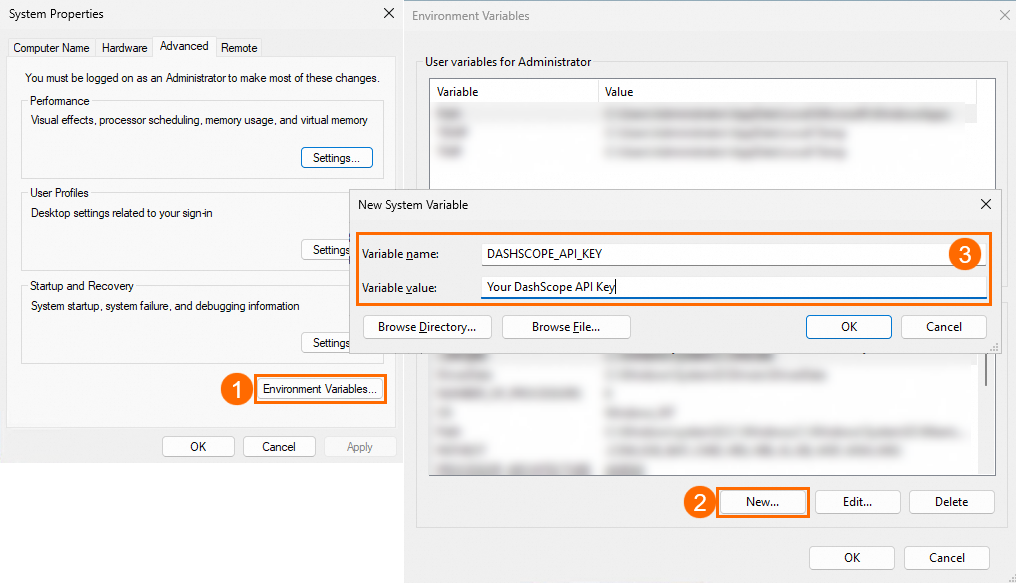
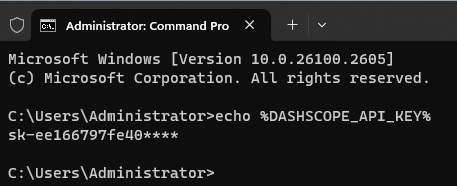
echo %DASHSCOPE_API_KEY%
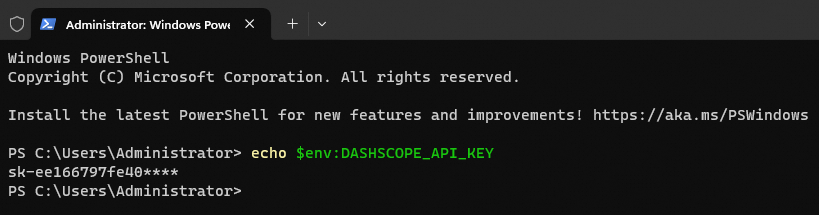
echo $env:DASHSCOPE_API_KEY
Tüm hazırlıkları tamamladınız! Şimdi seçtiğiniz programlama dili ile ilk Qwen API çağrınızı yapın.
python -V
pip --version
pip install openai
hello_qwen.py dosyasını oluşturun ve aşağıdaki kodu ekleyin:
import os
from openai import OpenAI

client = OpenAI(
    api_key=os.getenv("DASHSCOPE_API_KEY"),
    base_url="https://dashscope-intl.aliyuncs.com/compatible-mode/v1"
)

completion = client.chat.completions.create(
    model="qwen-plus",
    messages=[
        {'role':'system', 'content':'You are a helpful assistant.'},
        {'role':'user', 'content':'Who are you?'}
    ]
)

print(completion.choices[0].message.content)
Çalıştırmak için:
python hello_qwen.py
node -v
npm -v
npm install openai
const OpenAI = require('openai');

const client = new OpenAI({
    apiKey: process.env.DASHSCOPE_API_KEY,
    baseURL: "https://dashscope-intl.aliyuncs.com/compatible-mode/v1"
});

async function main() {
    const completion = await client.chat.completions.create({
        model: "qwen-plus",
        messages: [
            {role: 'system', content: 'You are a helpful assistant.'},
            {role: 'user', content: 'Who are you?'}
        ]
    });
    console.log(completion.choices[0].message.content);
}

main();
Çalıştırmak için:
node hello_qwen.js
<dependency>
    <groupId>com.alibaba</groupId>
    <artifactId>dashscope</artifactId>
    <version>2.15.0</version>
</dependency>
import com.alibaba.dashscope.aigc.generation.Generation;
import com.alibaba.dashscope.aigc.generation.GenerationParam;
import com.alibaba.dashscope.aigc.generation.GenerationResult;
import com.alibaba.dashscope.common.Message;
import com.alibaba.dashscope.common.Role;

public class HelloQwen {
    public static void main(String[] args) {
        Generation gen = new Generation();
        Message systemMsg = Message.builder()
            .role(Role.SYSTEM.getValue())
            .content("You are a helpful assistant.")
            .build();
        Message userMsg = Message.builder()
            .role(Role.USER.getValue())
            .content("Who are you?")
            .build();

        GenerationParam param = GenerationParam.builder()
            .apiKey(System.getenv("DASHSCOPE_API_KEY"))
            .model("qwen-plus")
            .messages(java.util.Arrays.asList(systemMsg, userMsg))
            .resultFormat(GenerationParam.ResultFormat.MESSAGE)
            .build();

        GenerationResult result = gen.call(param);
        System.out.println(result.getOutput().getChoices().get(0).getMessage().getContent());
    }
}
curl kullanarak doğrudan terminal'den API çağrısı yapabilirsiniz. Bu yöntem hızlı testler için idealdir.
curl https://dashscope-intl.aliyuncs.com/compatible-mode/v1/chat/completions \
  -H "Content-Type: application/json" \
  -H "Authorization: Bearer $DASHSCOPE_API_KEY" \
  -d '{
    "model": "qwen-plus",
    "messages": [
      {"role": "system", "content": "You are a helpful assistant."},
      {"role": "user", "content": "Who are you?"}
    ]
  }'
Detaylı API parametreleri, rate limitler ve tüm endpoint'ler için resmi dokümantasyonu inceleyebilirsiniz.
Qwen API Reference